Engineering
Arekta Transport: Checking a Ride When the Network Is Optional
Arekta engineering, on the transport system running at BAIUST.
Srejon Khan40 min read
On this page
- The check that runs every morning is a card against a roster on the scanner. About 1,500 students at Bangladesh Army International University of Science and Technology ride. The beep does not wait on cabin Wi-Fi.
- CardDesk writes that card to SQLite first and syncs to the campus API when it can. Tracking, engine lock, and overnight firmware updates are built. A simulator publishes the same MQTT a tracker will. No tracker is mounted on a bus.
Arekta Transport is the system we run for a campus fleet: vehicles, routes, cards, a handheld scanner, and a vehicle tracker. It is multi-tenant. One tenant is in daily use. BAIUST, in Cumilla, is a Bangladesh Army university. The stack behind a tenant is its own: Mongo, Redis, Influx, EMQX, an API, an ingest process, and a web app, deployed as a Coolify compose project.
This post is about the path that already has to work when the 07:50 leaves, and about the tracking path we built beside it so those lessons would not have to be learned on a moving bus.
The constraint is the network, and it is not ours. Registration was a hall. The check is an aisle. Both drop Wi-Fi. A desk that waits on POST /api for every card stops the line. A scanner that waits on the campus network stops the aisle. So the decision moved onto the two devices we do control: the laptop commits before it talks to Mongo, and the scanner decides a tap from a file on its SD card.
Figure 1: Students, the scanner, CardDesk, and the per-campus stack. The tap does not have to cross that stack.

Why the Check Cannot Wait on the Network
Registration day was the deadline that already happened. It was on campus, at a table, and about 1,400 students were going to stand in that line the next morning. The desktop app that links a MIFARE card to a student did not exist in a form we could trust on that Wi-Fi. We built CardDesk through the night. SQLite on the laptop. An ESP32 enroller on USB serial. Photos from the webcam. A queue that could not stop because the access point in the hall had opinions.
The next day we ran that laptop on premise and got the line through. The database we imported afterward, carddesk (1).db, holds 1,487 students, with holders and NFC credentials, and the departments, level-terms, routes, and pickups matched the campus catalog. Those three numbers are different facts. About 1,400 people in the line that day. 1,487 rows in the desk file. About 1,500 students on the system in a normal week now. Mixing them into one round number would be tidier and wrong.
A thin client, where every tap waits on the API, dies in exactly the room we were standing in. ADR-001 records the decision the room had already forced. SQLite is the live copy for issuance. Mongo is the system of record once a sync lands. A nightly batch would have left the web admin a day behind, which is useless the moment anyone else needs to see who has a card. The pump runs about 400 ms after the local write, when the network is there, and it waits when the network is not.
The same split shows up on the bus, with a smaller file and a harder deadline. The operator is walking the aisle. The roster for that run is already on the SD card. The green lamp is the decision. evaluateVehicleBoarding on the API is the server's reading of the same tap, and it runs when the batch comes home.
The line does not scale with the access point. It scales with the commit on the laptop and the file on the scanner.
Direct dependence on the API was the right shape while we were sketching the product. It stops being right at a few hundred people in a room with one access point, and it is worse on a bus. Fan-in here is not a million clients. It is one hall, then one aisle, and the radio in both places is the part we cannot fix by noon.
What the Scanner Is
Students carry a card. The operator carries a scanner we printed ourselves. Firmware on the board is 2.0.0-touch.
RFID is a PN532 on I2C, interrupt on GPIO 25, reset on GPIO 32. It reads MIFARE block 4, the student id, and block 5, the HMAC. The screen is a color TFT on SPI: chip select 5, data/command 16, reset 4, backlight on GPIO 12. Touch is an XPT2046 on that same SPI bus, chip select 15. The SD card shares the bus, chip select 17. A green lamp sits on GPIO 14, a red lamp on GPIO 2, and the buzzer on GPIO 27. The yellow and red controls you see in the photos are on the case. The menu is the touchscreen.
students.bin holds up to 2,048 students, 50 bytes each, with a UID index beside it. routes.bin holds four route names and twelve pickup names, whichever set we enrolled for that run, not the campus catalog of nine routes and thirty-six pickups. Taps append to scans.bin and stay there until a serial sync to the desk, or the scanner's own Wi-Fi batch upload, marks them synced.
The card crypto lives on the laptop, not on this board. Block 4 is the student id, space-padded to 16 bytes. Block 5 is the first 16 bytes of HMAC-SHA256 over the UID and block 4. The enroller is an ESP32 on USB serial at 115200. The laptop computes the blocks. The board writes the bytes it is handed. Verify mode reads the UID, the student id, and the HMAC back, and the desktop checks them against SQLite. The secret stays on the laptop. A board on a table in a hall only sees the bytes it is told to write.
The shell, then the print
We drew the shell before we printed it. The first clip, about 17 seconds, is the pistol grip: a handle, and a head that leans forward so the card meets the reader while the operator is still standing in the aisle.
The second clip, about 37 seconds, is the head of the case and the screen window. GREEN is cut into that window. In the model it reads backwards, because you are looking at the inside face of the shell.
The third clip is about 12 seconds, shot on a desk after the print came off the bed. A hand turns the black shell over. You can see the layer lines, the handle, and the window the TFT eventually sat in. The units on the bus are that shell with a board in it.
On a ride
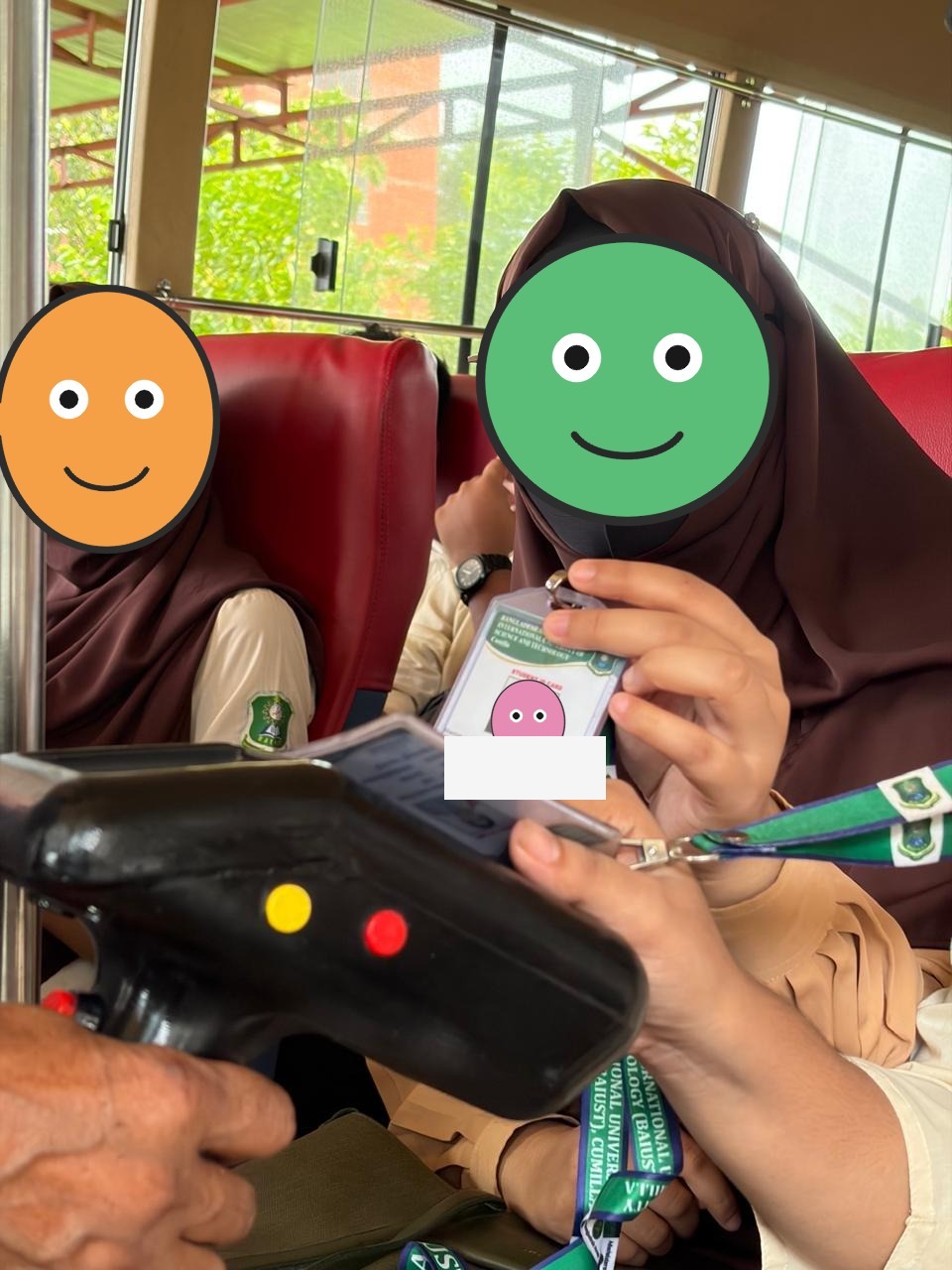
These three frames are from a ride that already happens.
A student holds the ID card up to the reader. Yellow button, red button, the screen between them, the operator's hand on the grip.
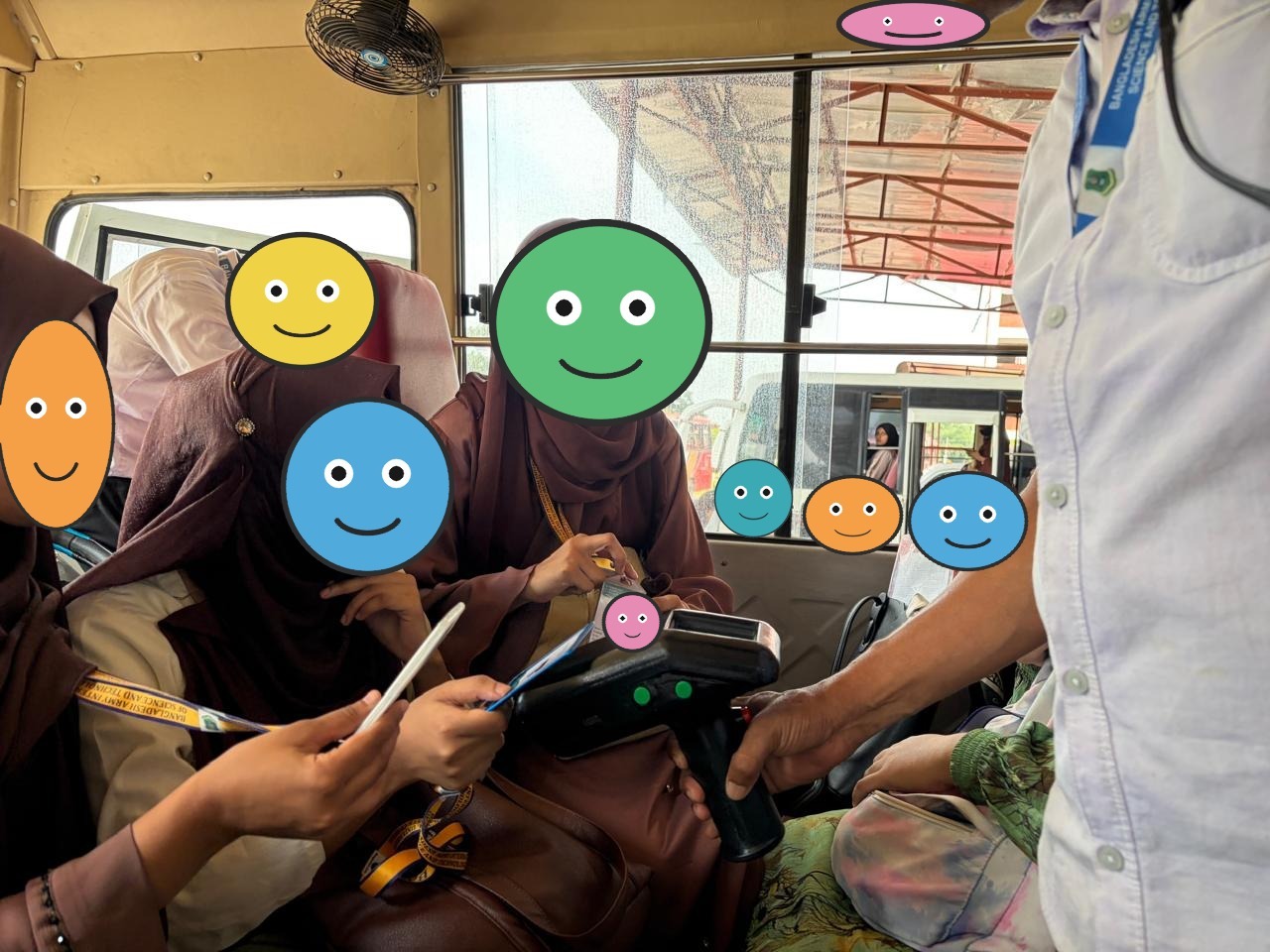
Further down the aisle the same gun is out, green lamps lit on the top edge, another card coming in from the left. A second bus is visible through the window. The check is a walk from the front seat to the back.
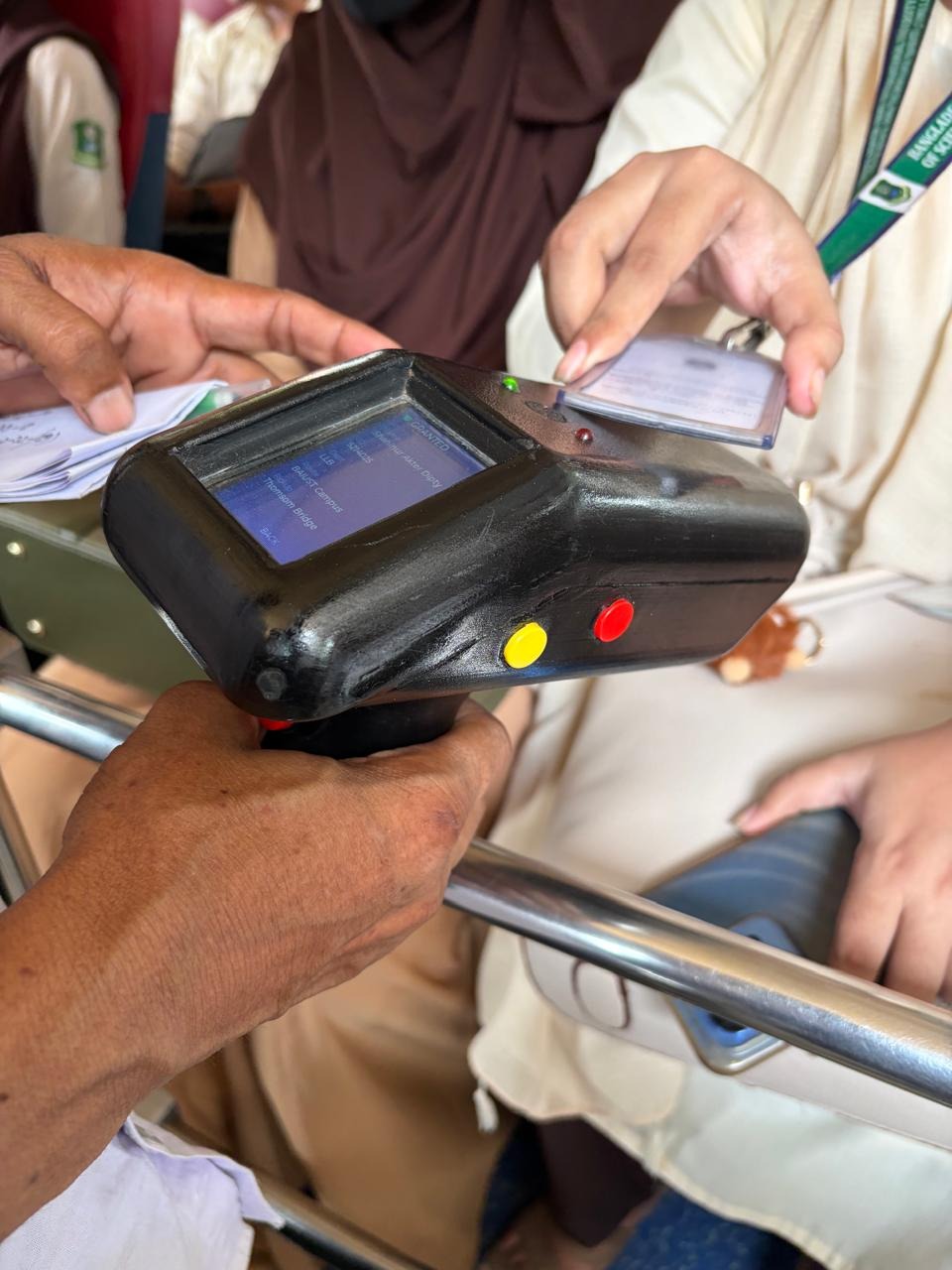
Close up, the screen is the route the operator selected. The card is waiting at the top edge of the shell, over the PN532. The SD card already has this route's roster.
How a tap is decided
PassCheck accepts a card that is on the roster. In protected mode it also checks the HMAC on block 5. RouteCheck does both of those and then compares the student's route and pickup with the ones the operator picked on the screen. A miss comes back as Wrong Route, Wrong Pickup, Unknown Card, or Invalid Signature: red lamp, fail beep. A hit is the green lamp. The photo on the rail is that menu, Change and Back, with Tomsom Bridge and Paduar Bazar in the list for that run.
When the batch comes home, evaluateVehicleBoarding is the server's reading of the same tap. The credential has to be active. The holder has to be active. Then entitlement: eligible, and if a route is in play their allocated routes include it. Failing that, a QR credential can carry them. Failing that, an approved same-day single pass. Otherwise not_entitled.
Taps that happened with no network sit in scans.bin on the gun, then in scan_history on the desk, until the pump posts them to POST /api/cards/events. Each access event has an idempotencyKey. A double tap, or a retry of the same batch, does not become two boardings.
Eligibility is a copy of a decision the cloud already made. That was the rule on registration morning too. We could write a card for everyone in the line. Clearing a student who had not been cleared was somebody else's job, on the API. The scanner carries the copy.
What CardDesk Is
CardDesk is the Tauri app on the registration laptop. Its SQLite file (carddesk.db, WAL, a 15 second busy timeout) holds people, card UIDs, the outbox, scan history, and cursors. The cloud holds a Holder, a Credential (RFID or QR), an AccessEvent, and sometimes a User who can log in. The Holder is the rider. The User is optional. A desk-registered student is a rider even if nobody has made them a login.
Before any of that moves, the desk gets a Harbor lease and trades it for a desk device JWT at POST /api/desk/session. Push is the outbox. Pull is updatedAt greater than the cursor, back onto local people and local cards.
Figure 2: SQLite on the laptop, Mongo in the tenant API. The outbox is the only write path from the desk.

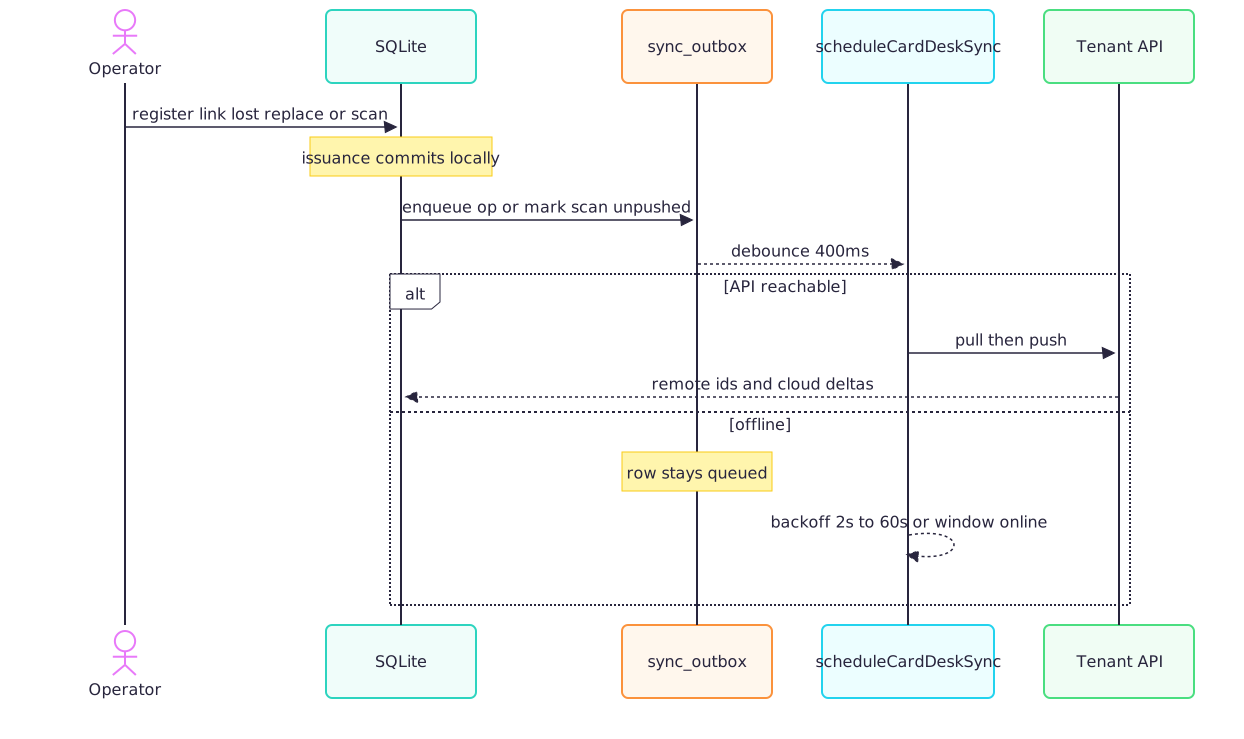
The operator hits save. The student row is committed. Then an outbox row is enqueued, or a scan is marked pushed_to_server = 0. About 400 ms later scheduleCardDeskSync calls runCardDeskSync. If the API answers, the run pulls deltas and then pushes, and remote ids come home onto the SQLite row. If the API does not answer, the outbox row stays. The pump backs off from 2 seconds, doubling, capped at 60. A browser online event starts it again without waiting for the cap.
The student in front of the table left with a card. The hall Wi-Fi could catch up later, or it could sit there sulking. The row was already committed.
Figure 3: A local write, then a debounced sync. The card does not wait for the second step.
The queue
| Local action | Queued as | Cloud effect |
|---|---|---|
| Register or bulk-import a person | holder_upsert | POST /api/holders, create or match externalId |
| Edit name or phone | holder_upsert | same upsert |
| Link, lost, replace, deactivate, activate, reset | the matching card_* op | /api/cards create or status |
| Scanner tap | scan_history.pushed_to_server = 0 | POST /api/cards/events |
| Delete a person on the laptop | nothing | the cloud holder stays |
Delete is the sharp edge. We did not want a mis-click on a desk in a noisy hall to erase the rider the web app and the boarding check still depend on. Removing a person from the laptop is a local cleanup. Removing them from the campus is an admin action on the API.
Bulk import reads the IUMSS transport registration spreadsheet straight into SQLite. That path is how a list of hundreds of students becomes rows before anybody picks up a card. The linking screen is a wizard for the part that still needs a human: filter by department, level-term, and whether they already have a card, preview the match, then walk one student at a time. Scan, write, next. The cloud chip in the top bar says synced, queued, error, or offline. Each row has its own icon: on the server, queued, or not sent. During registration those icons were the difference between "we will catch up" and "this laptop is alone."
One sync run
runCardDeskSync always starts with ensureDeskSession. Then, in order:
- Pull holders,
updatedAtafterholders_since, 200 per page, and keep going until a short page. - Upsert those people locally.
- Pull cards the same way, 200 per page.
- Apply RFID status onto the local card rows. A web user who marked a card lost shows up here.
- Push the outbox, oldest first, 120 ops this run.
- Push scans that are still unpushed, 200 this run.
- Copy route and pickup names onto the local catalog.
- Advance the cursors.
Figure 4: Pull, then push, then move the cursors. A link cannot land before its holder.

Order inside the push is the whole trick. The outbox is FIFO by created_at. A holder_upsert for a student has to land before that student's card_link, or the API is asked to attach a UID to a holder it has never seen. A desk that was offline through a long registration can need more than one run to drain a backlog bigger than a page. The pump's 15 second tick, while anything is still queued, is what walks that off without an operator mashing a button. Settings still has "Sync from Server" for when you want to watch it happen.
The README still says 400 rows and a 30 second tick. The code in db-sync.ts is PULL_PAGE = 200 and a 15 second interval. Debounce, the 120 op push, the 200 scan push, and the backoff match both. If you are debugging a desk that seems slow to catch up, trust the code.
There is no midnight cron. While CardDesk is sitting on the login screen or the dashboard, the pump starts once. It runs again about 400 ms after any outbox or scan write, on the browser online event, and every 15 seconds while the queue still has something in it. A failure backs off from 2 seconds to 4, then on up to 60.
Figure 5: The pump follows writes and the network. It is not a nightly job.

Who wins a field
Last-write-wins on the whole person was the design we refused. A cloud eligibility change would have clobbered a UID the desk had just written, or a desk edit would have clobbered a pass a coordinator had just granted. So the split is by operation, not by timestamp.
The desk wins UID link, lost, replace, activate, and deactivate. Those are facts created with the card in hand. The cloud wins isEligible, allocated routes, and pass grants. None of those three are columns in CardDesk's SQLite. Boarding reads them on the API, in evaluateVehicleBoarding, every time a card meets a bus.
A "mark lost" done on the web appears on the next pull. A link still sitting in the outbox is still pushed after that pull. The pull does not eat the local queue. That ordering, pull then push, is what makes the two rules live together.
Figure 6: Desk-owned card state, cloud-owned entitlement.

| Thing | Owner | How it stays the same |
|---|---|---|
| Departments, level and term, routes, pickup points | Web admin and coordinators | The desk pulls them on every sync. CardDesk Settings is not a second catalog. |
| Name, student id, department, route, pickup, level and term | Holder on the API | Register and edit queue holder_upsert and send those fields as pack attributes. |
| RFID UID, lost, replace | The desk, at issuance | Desk wins. The cloud receives the outbox. |
| Web logins | Roster and admin | The desk does not create logins. If a User already has that student id, profile fields are copied onto them. |
| Transport eligibility | Cloud | Not stored on the laptop. |
Level and term exist because BAIUST is an education pack. A corporate tenant's desk follows the identity pack returned by POST /api/desk/session and skips level and term. Same binary, different pack. We did not fork the app per campus.
A UID becomes a card once card_link has left the laptop. That call creates a Credential, media: nfc, unique on uid, pointing at the Holder whose externalId is the campus student id. The handheld copies that roster onto the SD card.
Harbor Is the License Manager
Harbor is the name. The job is license management. The service lives at harbor.arektacompany.com. It decides which organization may run, how many machines that organization may run, and whether the package includes OTA and CardDesk updates. BAIUST is an organization on it. The package names the plan and the seat caps. Seats are separate piles: CardDesk laptops, tracker-esp32, scanner-esp32, and enroller-esp32. An admin opens License in the web app, which calls GET /api/harbor/status and is limited to the Admin role. The page shows seats used against the cap, the package name, and whether the organization is active. Invoices stay on the Harbor portal. This app never sees a card number.
CardDesk stays on the activation screen until that license says the laptop is ours to run.
The organization key touches the laptop once. Activation posts it to Harbor POST /api/v1/activate with product carddesk, the machine id, the hostname, and the platform. Harbor sends back a lease token, the organization, an expiry, and graceDays. If graceDays is missing we store 14. If it is 0 or below, that desk is an offline license, and a dead network does not expire it. The token goes into the SQLite activation table. After that the key's job is finished. The lease is what the machine keeps.
Figure 7: A desk activates once, keeps a lease, and trades that lease for a session. A refusal is 403, because CardDesk 1.0.3 treats 401 as an order to wipe the desk JWT.
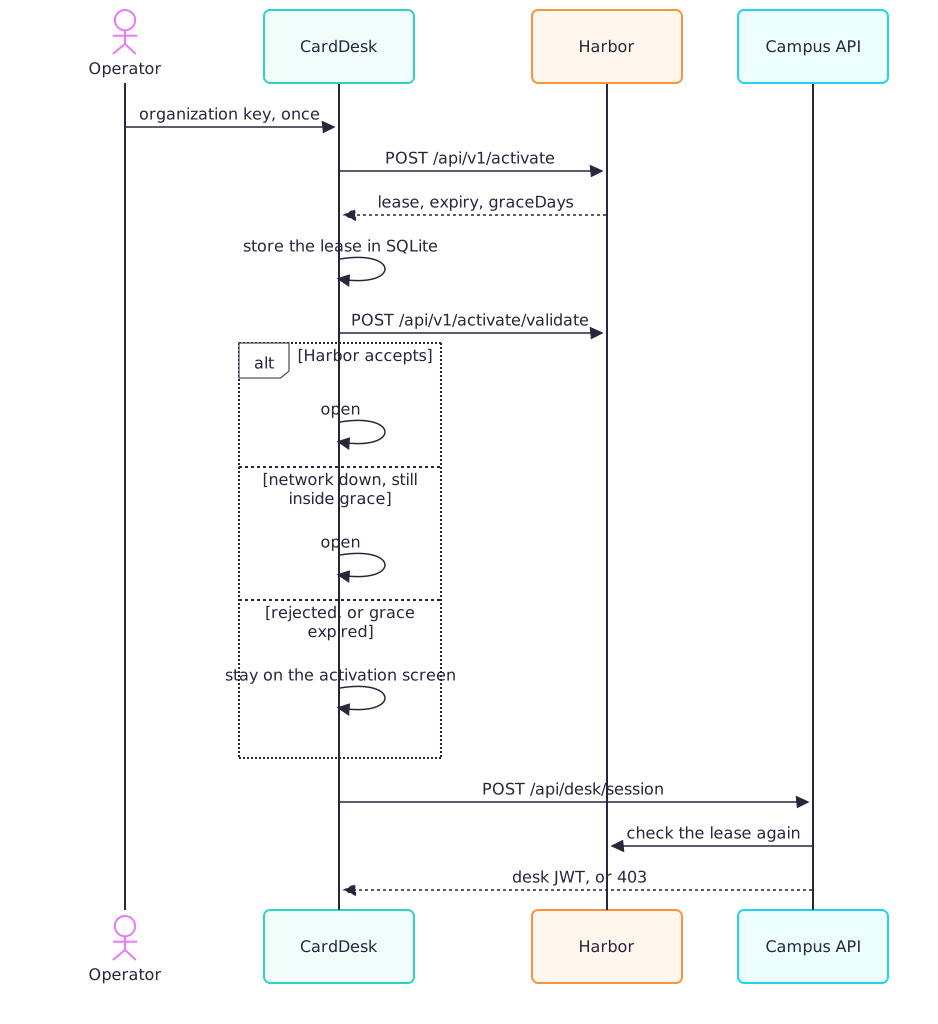
Every launch runs validateHarborLease. A laptop with no activation row stops on the activation screen. A legacy USB key, and the dev bypass, skip the online call. Every other desk posts the lease token and the machine id to Harbor POST /api/v1/activate/validate. If Harbor accepts, the desk writes last_validated_at, the expiry, and the grace, and the app opens. If Harbor rejects the lease, the operator is still looking at that screen. When the request never leaves the building, an offline license opens anyway. A normal lease opens only while the clock is still inside graceDays of the last good check. Past that, the screen says the offline grace expired, and somebody has to find a network and reopen.
Fourteen days, when the lease does not override it, is how long a desk can keep issuing cards in a room with no route to Harbor. The sync pump is a different timer. It still fires a few hundred milliseconds after a save.
The same lease is what the desk shows the API before a sync, at POST /api/desk/session. verifyDeskLease is picky, and the status code is part of the pickiness. CardDesk 1.0.3 treats any 401 as an order to wipe the desk JWT, so a refusal comes back as 403 and DESK_UNAUTHORIZED. A CARDDESK_DESK_KEY that matches the lease token is enough to pass. When the API has Harbor configured, a lease token is checked again at POST /api/v1/activate/validate. A machine that is already a DeskDevice on this campus can also get a session with no fresh lease. Those are the USB-key desks from registration, which still need a JWT if they are going to pull an update. A machine we have never seen, in production, stops there.
Settings has a button that gives the seat back. The desk posts Harbor POST /api/v1/activate/revoke, then deletes the local activation even when Harbor is unreachable, so the laptop can take a new key. The audit row is machine_license_revoked.
The organization key stays on the API. A tracker publishes identity and nothing else about the license. When that message is fleet/{id}/identity with product: tracker-esp32 and this tenant, the API claims the seat at Harbor POST /api/v1/devices and stamps harborClaimedAt on the bus. A wrong product string, or the wrong campus, and the claim is dropped. A failed claim waits 15 minutes and tries again. The simulator leaves identity off, which keeps a fake bus on the Cumilla graph from eating a real seat. Scanners and enrollers claim the same way, as scanner-esp32 and enroller-esp32, once they identify. We also ran a one-shot migration, release_fleet_harbor_claims_v1, that released seats taken before a unit had identified itself. Those had been claimed by buses that were only rows.
Figure 8: The package counts seats and names two features, ota and desktopUpdates. The campus file is a different switch. It decides which routes this API will run.

clients/baiust/config.json is what the API reads before it will run a route. Harbor does not look at fuel. Harbor looks at how many machines this organization may run, and whether the package allows OTA and CardDesk updates. Hit /api/fuel on this campus and you get 403 and FEATURE_DISABLED.
The Catalog the Card Already Uses
Thirteen vehicles. Nine routes. Thirty-six pickup points. Bus 01 through bus 10, two pickups, a hiace. A pickup seats 6. Hiace 01 seats 14. A full bus sits between 35 and 46.
Eidgah, Tomsom Bridge, and Police Line leave at 07:50, again at 09:40, and again at 11:10. Hotel Noor Jahan leaves at 08:00. Fares stay off this system.
Cantonment, Tomsom Bridge, Mazar Gate, Shaktola, Kotbari, and Nazira Bazar each exist twice, once for each carriageway. Eidgah to campus is the short chain: Fouzdari, Police Line, Race Course Overpass, Noapara, Alekhar Char, Cantonment. Tomsom Bridge to campus is the long one. If you believe every waypoint delay, it is about forty minutes, through Paduar Bazar, Beltoli, Jhagurjhuli, and Nazira. A student allocated to the up direction is waiting on their own side of the road. When the map goes live those have to stay different points, or the ETA is for the traffic going the other way. The card check already cares which route the student was given.
The map default sits on campus, 23.4724 N, 91.139 E. The coordinator shot below is the catalog loaded in the app, with no tracker publishing from a bus. The rides that morning were taps.
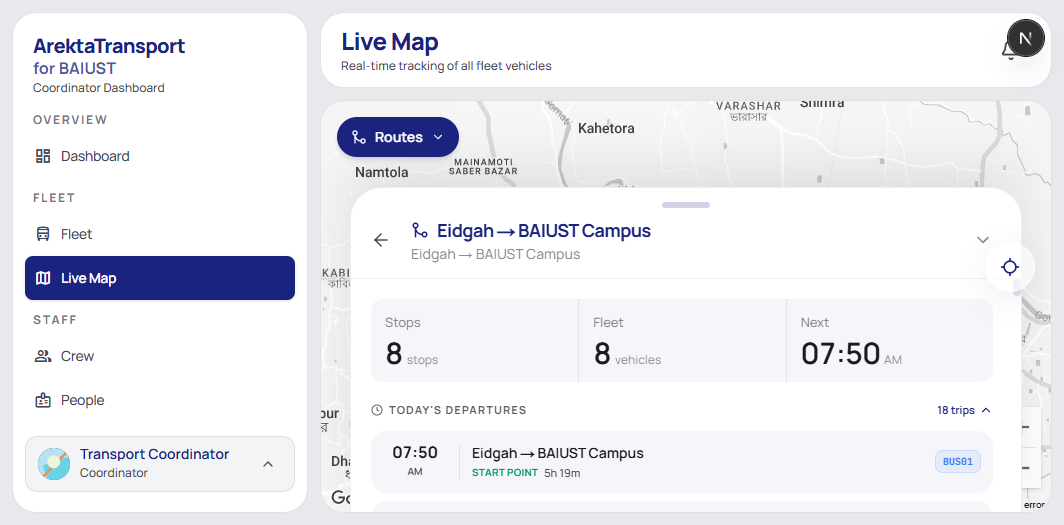
BAIUST gets its own database, its own broker, and its own clients/baiust/config.json. Identity is the education pack. People are students, the external id is a student id, email has to look like @baiust.ac.bd. Departments in the pack are CSE, EEE, CE, BBA, English, LLB, MBA. Level and term run from L1T1 through L4T2, plus fresher. Profiles cover students, faculty, staff, visitors, guests, and alumni. A second campus brings its own broker, its own bucket, and its own user table. The stack earning its keep this week is the one behind the card check. Influx and the location fan-out are already up, so a tracker has somewhere to land the day we bolt one in.
The Tracker, Still on the Bench
The tracker, which we call the VTS unit, is ready to bolt into a vehicle. The 07:50 still leaves without it. The board is an ESP32 (esp32dev in PlatformIO). Firmware 1.1.1. The build tag is tenant/device@version, so a log line tells you which campus and which bus the binary was flashed for.
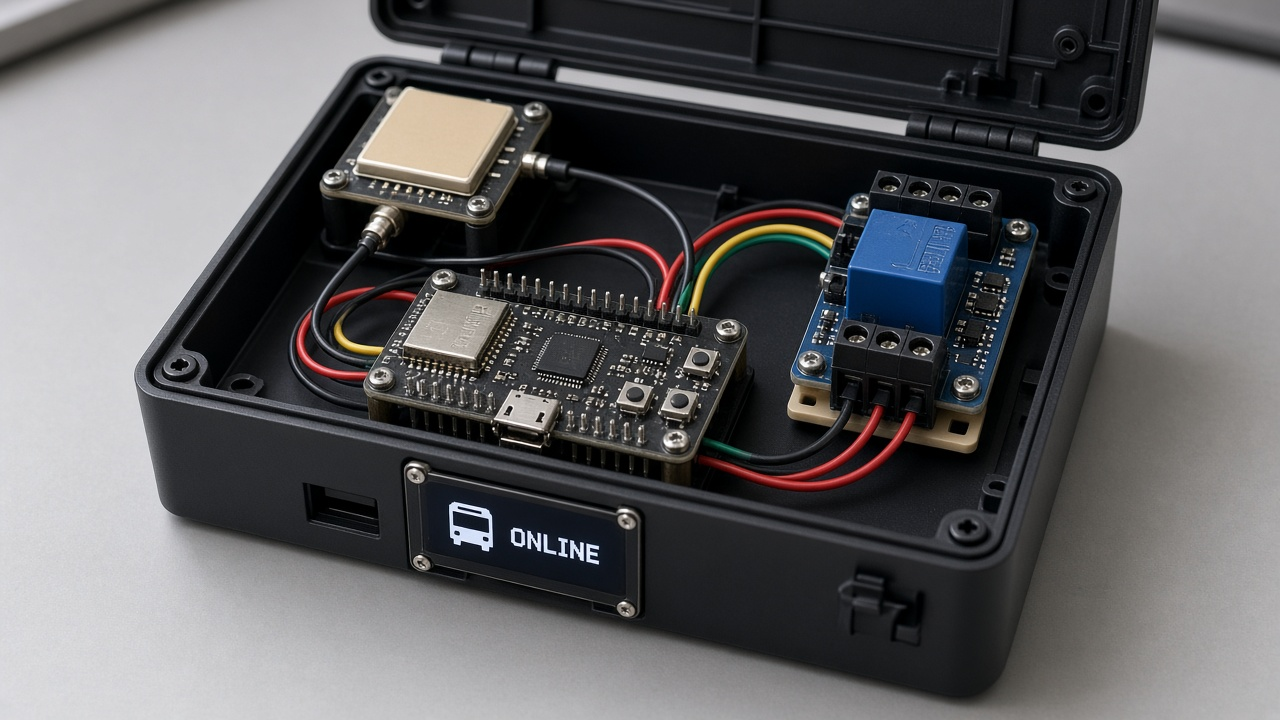
GPS comes in on UART2 at 9600 8N1. Receive is GPIO 16, transmit is GPIO 17. A relay on GPIO 26 sits in the engine circuit. Engine sense is an analog read on GPIO 34, 12-bit, and we call the engine running when the ADC value is at least 2000. The driver-facing screen is a SH1106, 128 by 64, on I2C address 0x3C, SDA 21 and SCL 22. The uplink on the board today is Wi-Fi in station mode, MQTT over TLS on port 8883, with the ISRG Root X1 pinned in the firmware. A GSM modem is the revision we want before these units depend on cabin Wi-Fi. It is not built. Neither radio is on a route today.
Figure 9: Pins on the VTS unit. Relay on GPIO 26, engine sense on GPIO 34, GPS on UART2.

setup() is boring on purpose. Load provisioning from NVS, restore the relay to the last commanded lock state, start the OLED, start GPS, join Wi-Fi, connect MQTT, subscribe to OTA, then fall into loop(). There is no second FreeRTOS task farm. One loop, with timers:
| Job | Cadence |
|---|---|
| Feed the GPS parser | every pass |
| Publish a location | 1000 ms |
| Read the engine sense pin | 1500 ms |
| Refresh the OLED | 1000 ms, screens rotate every 3 s |
| Check Wi-Fi | 5000 ms |
| Retry MQTT if the socket died | 5000 ms |
Figure 10: Boot order, then one loop. Location every second, engine sense every 1.5 seconds.

A fix does not leave the bus just because the module printed a sentence. If the satellite count is below 1 or HDOP is above 3.5, we hold the last good position and mark the fix bad. Movement inside 10 metres is dropped, because a parked bus otherwise walks around the yard all night. Speed under 5 km/h is clamped, then smoothed with an exponential average, alpha 0.40. The API applies a second filter later: when it sums trip distance it ignores any hop of 2 km or more. A single teleported point should not add a highway to the odometer.
On MQTT connect the unit publishes online to fleet/{id}/status, retained. The last will on that same topic is offline, QoS 1, also retained. If the bus goes into a tunnel and the socket dies, the broker tells everyone the unit is gone without us waiting for a timeout we invented. A second message, fleet/{id}/identity, carries deviceId, the tenant, product: tracker-esp32, and the firmware version. The API uses that identity to claim a Harbor seat. Wrong product string, wrong tenant, no seat.
Lock state is stored in NVS under engine / locked. Pull the power, put it back, and the relay comes up the way a coordinator left it. We did not want a brownout in Cumilla traffic to silently unlock a bus we had just stopped.
Publish is QoS 0. At one hertz, a lost packet is old news a second later. Commands are QoS 1.
Telemetry can be latest-wins. "Stop this engine" cannot.
HTTP POST /gps is still a door. Older firmware, and any day the broker path is unhappy, can post the same payload to the API. The API writes Mongo, then republishes onto MQTT with via: http-relay so ingest still fills Influx and Redis. When that republish comes back to the API, we skip it. Mongo gets one write. We kept both doors. A flag day on a bus that is already on a route is how you lose a morning.
The Map, and Why Phones Stay off the Broker
During the morning rush a browser on campus is still looking at the route list. The moving pins in this post are on a desk. The pipe below is what a mounted tracker will hit, and it is what the simulator hits now.
Phones stay off EMQX. A student handset has no device password, and it only hears buses on routes that student is allowed to ride. We split the pipe so the broker, the database, and the browser each do one job.
VTS unit  --QoS 0-->  EMQX
                         |-- API     Mongo trips, boarding, geofence, alerts
                         |-- Ingest  Influx bus_location, then Redis
Redis fleet:locations  --one subscriber per API process-->  Bun /ws  -->  map
Figure 11: Location from the unit to the map, including the HTTP side door. One Redis subscriber fans out to every browser on that API process.
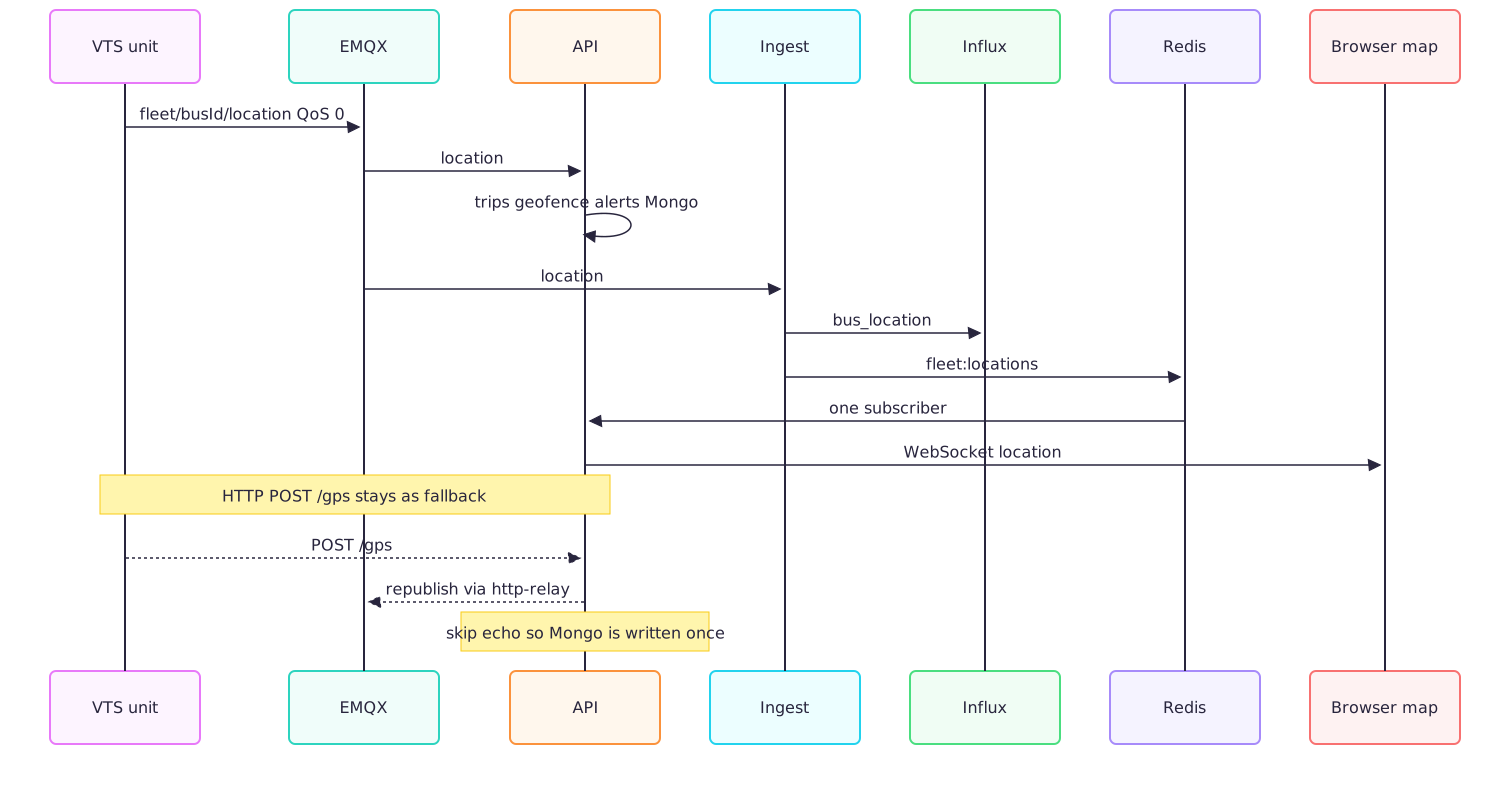
Ingest validates the body with the shared GpsPayload schema before it stores anything. The fields that matter on the wire are busId, lat, lng, optional speed, heading, altitude, hdop, a Unix timestamp in seconds, and the engine flags. Influx gets a point in the bus_location measurement. Retention on that bucket is 90 days. After the write, ingest publishes the same JSON to fleet:locations. Redis is the fan-out bus. Influx is the memory.
The API process opens one Redis subscriber for fleet:locations and one for fleet:alerts. That subscriber is a singleton for the process. Each connected browser is an entry in an in-memory map. Adding a few hundred tabs does not add a few hundred Redis connections. The socket itself is Bun.serve upgrading GET /ws. The HTTP app beside it is Hono. The JWT can arrive as ?token=, as Authorization: Bearer, or as Sec-WebSocket-Protocol: Bearer.<token>. We needed the protocol form because some hosted browsers are rude about custom headers on a WebSocket.
Admin, Coordinator, and Developer see every bus and every alert. A student sees locations for routes they are allowed to ride. If the GPS payload has no routeId, a cache built from today's schedules fills it in, and that cache refreshes every 60 seconds. Staff and Faculty receive location frames, and that is the end of their view.
The server sends a protocol ping every 30 seconds once a socket is older than 30 seconds. The message the browser actually renders looks like this:
{
  "type": "location",
  "data": {
    "busId": "bus03",
    "lat": 23.46,
    "lng": 91.18,
    "timestamp": 1710000000
  },
  "timestamp": "..."
}
type is location, alert, connected, error, ping, or pong.
Figure 12: One Redis subscriber, then a role filter, then sockets.

On the web app there is a single socket, mounted in the root layout by WebSocketProvider. It reconnects 5 seconds after a close. Location frames go into a module-level store, and useLiveTracking reads that store with useSyncExternalStore. A map, a list, and a details drawer can all show the same bus without each of them opening a socket. Frames whose timestamp is older than the one we already applied are dropped. Clocks on buses are not gentle, and a late packet should not drag a marker backwards down the road.
The first paint does not wait for the socket. LiveMap loads GET /buses and seeds markers from liveStatus.location. Then the stream takes over. The map library is Mapbox (light-v11 / dark-v11) or Google, picked by NEXT_PUBLIC_MAP_PROVIDER. Heading rotates the marker with a 0.3 second CSS transition. At low zoom the markers shrink so thirteen buses do not become thirteen billboards. Selecting a route draws the road geometry from the directions API and drops every pickup on that route. A marker counts as online when connectivity is not offline and the last fix is under 10 minutes old. The status chip on the details panel also shows GPS fix, engine locked or unlocked, and whether the sense line says the engine is running.
Once a unit is actually on a bus, the part a student would notice past the dot is the push. Ride alerts fire when the bus is about 5 minutes out, or when it enters a 200 metre radius around the pickup. The radius can be set anywhere from 50 to 2000 metres. ETA uses the GPS speed. A fix with no usable speed is treated as 25 km/h, which is honest on the Cumilla approaches in the morning and a lie on an empty highway. We left the routing engine alone. Web Push (VAPID, service worker, POST /alerts/devices) and Expo push on the phone app land in the same device list. Schedule matching looks plus or minus 180 minutes around a departure, because a 07:30 bus that left at 07:12 is still that bus. Alert state lives in Redis for 6 hours. A given event is deduped for 24 hours, a geofence crossing for an hour. processRideAlerts is fired and forgotten. A slow push provider can lag. It must not stall the GPS consumer.
Ops roles watching the same socket also see engine-lock alerts on fleet:alerts, which is how the details panel hears that a command landed.
The trip itself does not start because a timetable said so. A rising edge on the engine sense pin, off and then the ADC says running, creates a TravelHistory document in progress. If we have no GPS yet, the start coordinate falls back to campus. A falling edge closes the trip. GPS updates along the way append a HardwareLog breadcrumb. Journey view later reads that breadcrumb, downsampled to at most 400 points, and draws the path. Geofences are GeoJSON polygons, checked with Mongo $geoIntersects. Entering one can raise an alert. We tried "the bus is on a trip because the schedule says so" early and dropped it. A wire is harder to argue with than a timetable. Drivers leave early, they leave late, and a Friday schedule is a different animal from a Monday one.
Figure 13: Engine edges open and close the trip. Alerts ride the GPS stream beside that.

Engine Lock
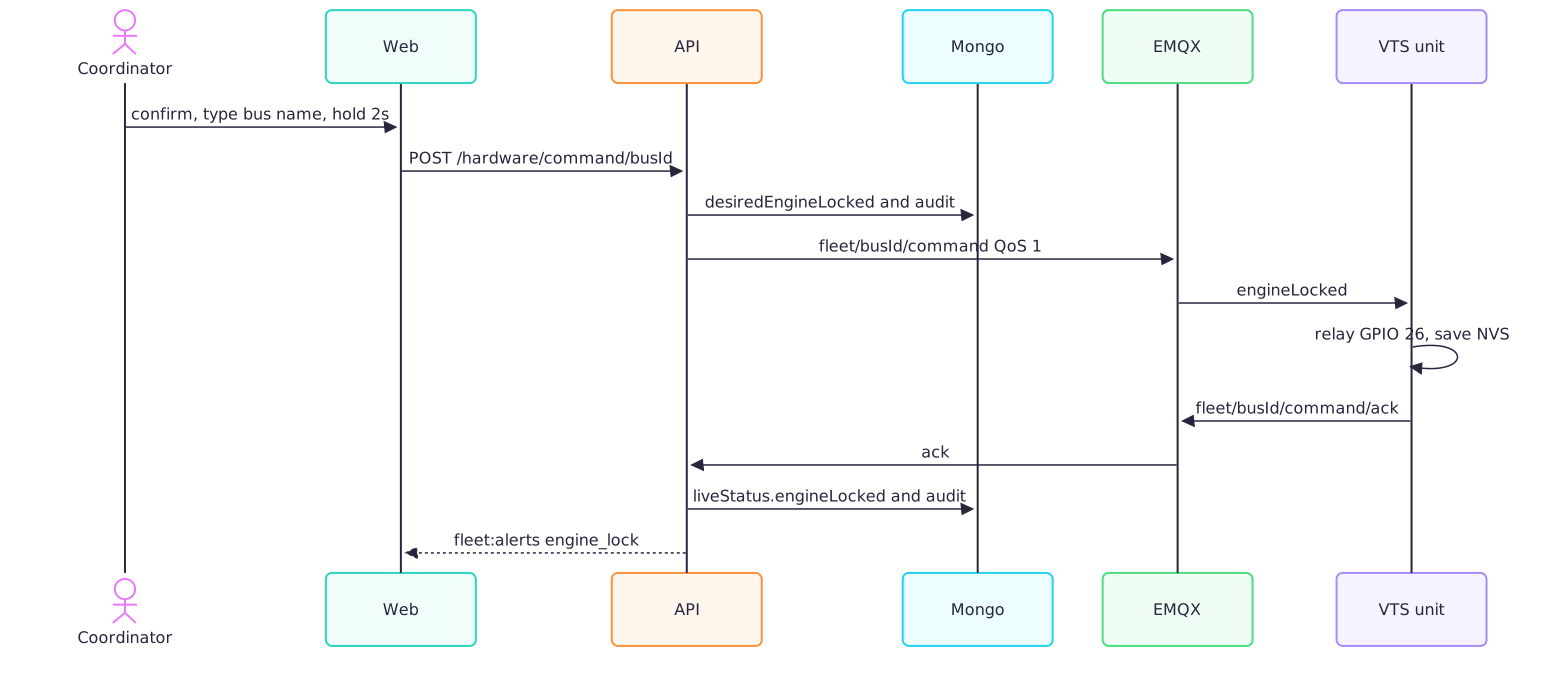
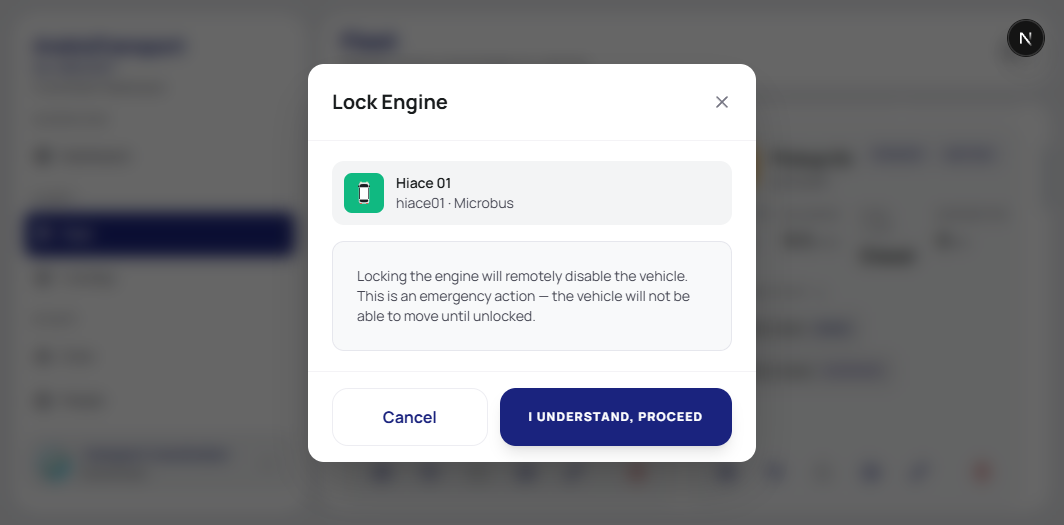
A coordinator can lock or unlock a bus from the fleet screen. The fleet manager screen makes that hard to do by accident: confirm, type the bus name, then hold the button for 2 seconds. The request is POST /api/hardware/command/:deviceId with { "action": "lock" } or "unlock". Only Admin and Coordinator pass the route middleware.
The API writes hardwareConfig.desiredEngineLocked on the bus, writes an audit row, and publishes to fleet/{busId}/command at QoS 1:
{ "engineLocked": true, "ts": 1710000000 }EMQX ACL is blunt about who may say that. The api-service account is the one allowed to publish fleet/+/command. A device username, which is the bus id, may subscribe to its own command topic and may publish fleet/{id}/command/ack. A tracker cannot lock its neighbour. A leaked device password cannot lock the fleet, because the device ACL does not include the command publish.
On the unit, onEngineCommand parses engineLocked, drives GPIO 26, stores the bit in NVS, and publishes the ack at QoS 0. The API's processMqttCommandAck copies that into liveStatus.engineLocked, aligns the desired flag with what the device reported, and writes a second audit row. The web resolves the chip as reported first, then desired. Before the ack you are looking at what we asked for. After the ack you are looking at GPIO 26.
Both writes hit the audit log, the command and the ack, tagged as a status change. If someone later asks who locked bus 07, the answer is a row with an actor. The details panel is the short version of that state: online or offline, whether the last packet had a GPS fix, engine locked or unlocked, and whether the sense line says the engine is running. The 2 second hold lives on the fleet manager. Nobody is using it on a moving bus this week. We put the hold there so the first real use takes a deliberate hand.
Figure 14: Lock command, relay, ack. Reported state wins over desired once the ack lands.
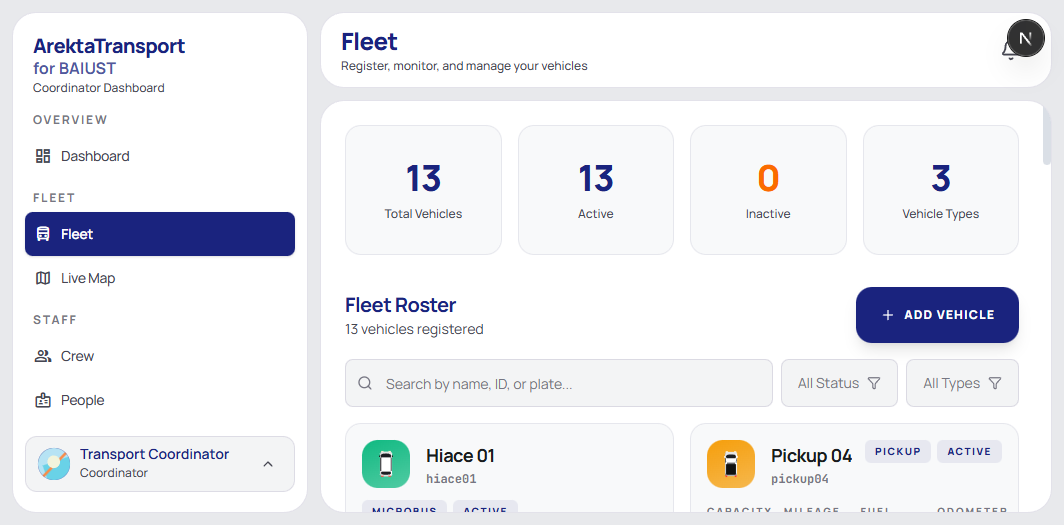
The fleet roster is where that button lives. Thirteen vehicles, three types.
A Password per Bus
Creating a bus in the fleet UI creates its EMQX user. The username is the bus id. The password is HMAC-SHA256 of that id under a server-side pepper, base64url, sliced to 32 characters. We can recompute it whenever a unit needs flashing, so there is no second secret sitting in a spreadsheet. A developer route, GET /api/hardware/mqtt-credentials/:deviceId, returns the user, the password, the host, and port 8883 so the unit can be flashed. MQTT_USER on the device must equal DEVICE_ID.
First boot copies those compile-time values into NVS. Later boots, and later firmware updates, read NVS. A new image at 1 a.m. does not mean re-provisioning Wi-Fi and MQTT on every unit.
Figure 15: From "create bus" to credentials that survive a firmware update.

Firmware and OTA
Three boards, three product names on the license. The tracker is tracker-esp32, firmware 1.1.1, in apps/firmware/tracker-fw. The scanner on the bus is scanner-esp32, firmware 2.0.0-touch. The enroller that writes the card is enroller-esp32, a USB serial writer at 115200. The enroller cannot take an over-the-air update yet. POST /api/ota/from-harbor with that product records the refusal and does not queue one.
Harbor stores the firmware artifact. A developer asks the campus API for it. Two switches have to agree. clients/baiust/config.json has to allow the ota route, or /api/ota answers 403 and FEATURE_DISABLED. The Harbor package has to include the ota feature, or the same call answers that this license does not include over-the-air updates. The device also has to have claimed a seat. A bus that is only a row does not get a download. desktopUpdates on that same package is a different bit. It gates a signed CardDesk release, not a firmware image.
The tracker path is a push. The API stores the desired version on the bus as pendingOta and keeps it until identity reports that version. The download URL is minted when we push, so a unit that sits offline for months does not hold an expired link. When the unit is online the API publishes {tenant}/{device}/ota at QoS 1, retained. The unit acks on {tenant}/{device}/ota/ack. The payload is version, url, checksum, size, and force. If the unit is offline, the desired version stays, and the next online event tries again after a 15 minute cooldown.
The scanner path is a pull. The same kind of desired version lands on the scanner record. The gun asks GET /api/hardware/ota with its device password. Nothing newer is a 204. A waiting update comes back as a freshly minted Harbor URL.
Figure 16: Harbor holds the artifact. The tracker is pushed. The scanner polls. The enroller has no OTA path yet.

On the tracker, the offer waits for local midnight to 4 a.m., UTC+6, unless force is set. Chunks are 4 KB. The download gives up after 60 seconds. Three retries, 5 seconds apart. If the offer includes a SHA256, the unit checks it before it writes the partition. An offer with no checksum skips that step. After reboot the unit has 30 seconds. Wi-Fi has to be up, the GPS fix has to be valid, and the API health check has to answer. Pass, and the image is marked valid. Fail, and the ESP32 boots the previous image. When identity later reports the target version, the API clears pendingOta.
Figure 17: Desired firmware stays on the bus until the tracker reports that version.
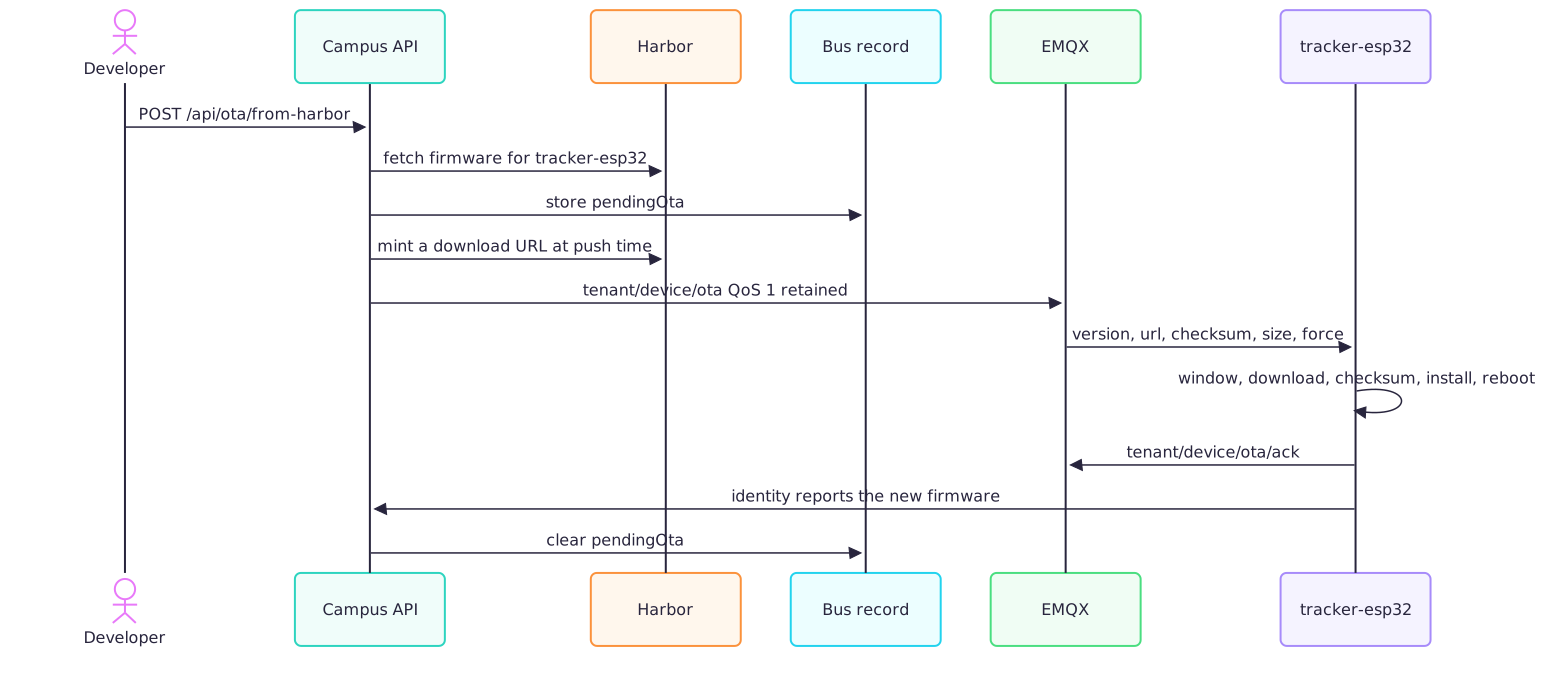
Figure 18: The tracker keeps the image only after the night window, the download, and a 30 second health check.

No tracker is on a route yet, so this window has not run on a moving bus. The rollback is the part we care about before that day. A bad flash on a bus that has already left the yard means a tow.
The Simulator Is a Tracker With No Vehicle
We wrote apps/simulator so this path can be run with no unit on a bus. Each vehicle is a VTS unit to the broker. Same client id, {tenant}_{busId}. Same retained online, same last will offline, same location payload, same lock command and ack. API, ingest, and the map read those packets the way they will read the ESP32. The vehicles drive the OpenStreetMap roads around BAIUST and Cumilla.
The GUI on port 4101 starts them, locks the engine, and injects the faults we want before hardware ships: GPS loss, packet loss, a bus that stops publishing. identity stays unpublished, so the fake buses do not take Harbor seats.
Figure 19: The simulator on the Cumilla roads, 13 of 13 live. Paduar Bazar is on the Tomsom corridor. Nothing in that list came off a tracker in a vehicle.
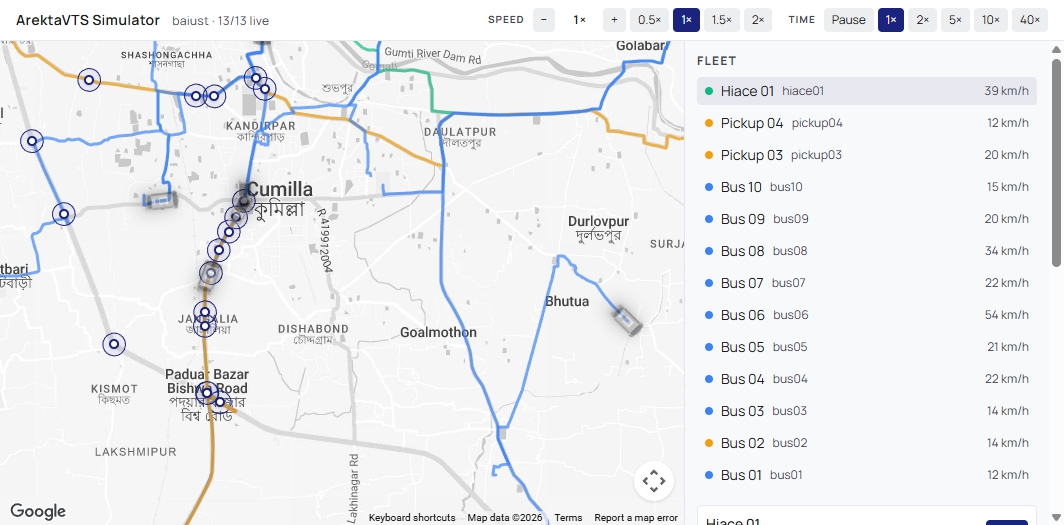
The header in that shot is baiust, 13/13 live, and the list shows road speed. If the fan-out or the role filter is wrong, it is wrong here, on a desk, while the buses students board are still checked with a card.
Where Each Capability Stands
What is in someone's hands this week is the scanner, the cards, and the laptop that writes them. The license check is why that laptop opens at all. The fleet screens, the map, the relay, and the firmware window are in the build. They leave the bench one deployment at a time.
RFID, GPS, schedules, maintenance, geofences, announcements, audit, reports, travel history, OTA, ride alerts, same-day passes, and the roster import are on for this campus. Fuel tracking is off.
| Feature | What it does | Where it stands |
|---|---|---|
| Scanner | Offline UID check on the printed gun. PassCheck, or RouteCheck against the selected route and pickup. | On every ride |
| Cards | MIFARE UID, student id on block 4, HMAC on block 5. Link, verify, replace, reset. | In use at the desk, checked on the bus |
| Same-day pass | An approved pass for one day when the student has no route allocation. | On for this campus |
| Access events | Each tap stored with an idempotency key, so a retry is one boarding. | On for this campus |
| CardDesk | Registration with a photo, import, campus catalog, semesters, scan history, desk audit. SQLite first. | In use |
| Enroller | ESP32 on USB serial. The laptop computes the blocks. The board writes them. | In use |
| Scanner provisioning | Enroll the roster onto the gun. Pull scans.bin back to the desk. | In use |
| Desk sync | Outbox push, delta pull, heartbeat of local counts against the cloud. | In use |
| Harbor license | Activate a desk, keep a lease, honor offline grace, count seats. | In use |
| Desktop update | Signed CardDesk update when the Harbor package allows desktopUpdates. | In use when a release is approved |
| Fleet | Vehicles, capacity, plate, odometer, active flag. Thirteen on this campus. | In the campus app |
| Routes and pickups | Nine routes, thirty-six pickups, both carriageways kept apart. | In the campus app |
| Schedules | Departures, including 07:50, 08:00, 09:40, and 11:10. | In the campus app |
| Crew | Drivers and helpers assigned to the fleet. | In the campus app |
| People | Holders for students, faculty, staff, visitors, guests, alumni. | In use |
| Roster import | Campus roster into holders, behind the BAIUST roster flag. | On for this campus |
| Desks | Each CardDesk machine, last sync, pending outbox, local counts versus cloud. | In the campus app |
| Announcements | Notices from the campus office into the student portal. | On for this campus |
| Maintenance | Service records on a vehicle. | On for this campus |
| Reports and audit | Summaries, and a log of who changed a record. | On for this campus |
| Fleet request | A student asks for a ride. A coordinator decides. | On for this campus |
| Student portal | Schedule, announcements, friends, profile, pass, alerts, fleet request. The map draws the routes. | In the campus app |
| Live map | One-hertz pins, role filter, Mapbox or Google. | Built. Quiet until a tracker is mounted |
| Engine lock | Relay from the fleet screen. Type the bus name, hold two seconds. | Built. Not on a moving bus |
| Geofences | Draw and test an area. A crossing needs a publishing tracker. | On for this campus |
| Ride alerts | About five minutes out, inside a radius, matched to a schedule. | Built. Quiet until a tracker publishes |
| Travel history | A trip opens and closes on the engine edge. | Built. Quiet until a tracker is mounted |
| OTA | Tracker firmware is pushed over MQTT. The scanner polls for a Harbor URL. The enroller has no OTA path yet. Then the night window, a health check, or rollback. | Built. The campus flag and the Harbor package both have to allow it |
| Simulator | A VTS unit in software. Same MQTT as the firmware, on the Cumilla roads. Identity stays unpublished so it does not take a Harbor seat. | How we test tracking without a bus |
| Fuel | Fuel pages and /api/fuel. | Off for this campus |
What's Next
The card check is the morning we already have. The tracker still has to leave the bench. When it does, firmware lands between midnight and 4 a.m. Bangladesh time, and a failed health check boots the previous image. The location path is already a one-hertz stream from fleet/{busId}/location into the map. A GSM modem is the uplink we want on that board before a bus has to trust cabin Wi-Fi. Until a unit is actually bolted in, the morning is a scanner, a UID, and evaluateVehicleBoarding.
The Team
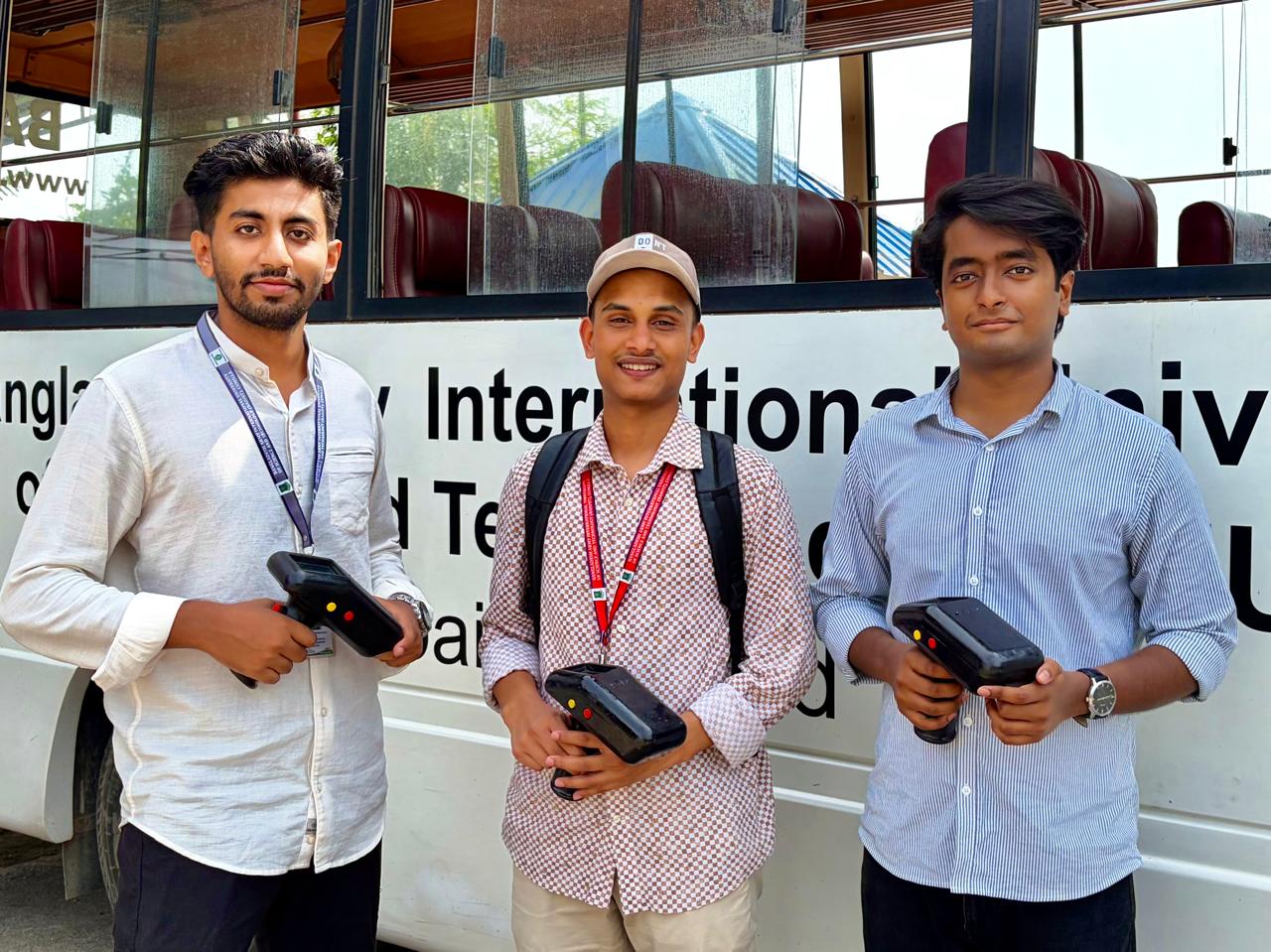
This is the three of us in front of a BAIUST bus, a scanner in each hand. The shells in the CAD clips and the print video are these same guns, and they are the ones walking the aisle on a normal morning.
Names
| Word | What we mean |
|---|---|
| CardDesk | The laptop app that writes a student onto a MIFARE card. SQLite first, cloud later. |
| Holder | The rider record in Mongo. A student id, a name, a route. |
| Credential | The card itself. A UID pointing at a holder. |
| UID | The number the PN532 reads off the card before it looks at anything we wrote. |
| Scanner | The handheld on the bus. ESP32, screen, SD card, PN532. It can decide a tap with no network. |
| VTS | The tracker built for the bus. GPS, relay, OLED. Not mounted on the routes yet. |
| Outbox | The queue of desk writes waiting for the API. |
| EMQX | The MQTT broker. Tracker traffic. The scanner does not need it for a tap. |
| Harbor | The license manager. Organizations, packages, seats, and firmware artifacts. |
| Lease | The token a CardDesk machine keeps after activation. The org key is only used to get it. |
| Seat | One licensed machine: a desk, a tracker, a scanner, or an enroller. |